

Seeing fault code SPN 1231 FMI 9 on your display points to a communication breakdown, a common type of J1939 fault code, between your machine’s electronic modules. It means a critical component has stopped “talking” on the network, which can cause erratic behavior or shut down functions entirely. This guide provides a clear, step-by-step process to diagnose this data link error, starting with the simplest checks to get your equipment communicating correctly and back on the job.
What Is SPN 1231 FMI 9?
The diagram of a machine’s CAN bus network highlights a communication failure, which is the root cause of an SPN 1231 FMI 9 fault.
This fault code means: J1939 Network #2 – Abnormal Update Rate.
Unlike a mechanical fault, FMI 9 indicates an information problem. A specific Electronic Control Module (ECU) on the vehicle’s data network (the CAN bus) is not sending out information as expected. The other modules are listening, but one has gone silent. This isn’t a sensor failure; it’s a network communication failure.
| Parameter | Description |
|---|---|
| SPN Code | 1231 |
| FMI Code | 9 |
| Fault Meaning | A device on the CAN bus network has an abnormal update rate (is not communicating). |
| Typical Cause | Wiring issues, a faulty terminating resistor, or a failed electronic module/ECU. |
| Component Affected | J1939 data link harness, connectors, and all connected ECUs. |
| Impact | Unpredictable system behavior, loss of function, or failure to start. |
What Are the 4 Common Symptoms?
When a control module stops talking to the rest of your machine, you’ll see strange warning signs. The most common one is multiple warning lights that pop up at once for unrelated systems. You might also notice gauges acting weird, like speedometers or temperature needles jumping around or going dead. Another clear sign is a loss of certain functions, such as transmission shifting, fan control, or A/C not working. In some cases, the machine won’t start at all if the failed module is a main ECU, like the engine or transmission controller.
Why Does SPN 1231 FMI 9 Happen? 4 Common Causes
This fault code almost always points to an electrical or network communication issue, not an immediate ECU failure. Before buying new parts, check these simple and common causes carefully.
- Damaged Wiring or Connectors: This is the number one cause. The wires in the J1939 communication harness (usually green and yellow) can rub, break, or corrode. Connectors may also have bent or rusty pins that block the signal.
- Faulty Terminating Resistors: The CAN network that links all modules needs a 120-ohm resistor at each end. If one fails or becomes disconnected, the whole network can lose communication, giving you the SPN 1231 FMI 9 code.
- Low System Voltage: Weak batteries or bad alternators cause voltage drops that make modules shut down or drop offline. Low voltage is one of the easiest causes to miss, but also the easiest to fix.
- A Failed ECU: This is the rarest cause, but still possible. If one ECU stops sending signals, it can stop the others from working too. In other words, “one bad module can make the whole machine act crazy.”
How to Fix SPN 1231 FMI 9: A 4-Step Diagnostic Plan
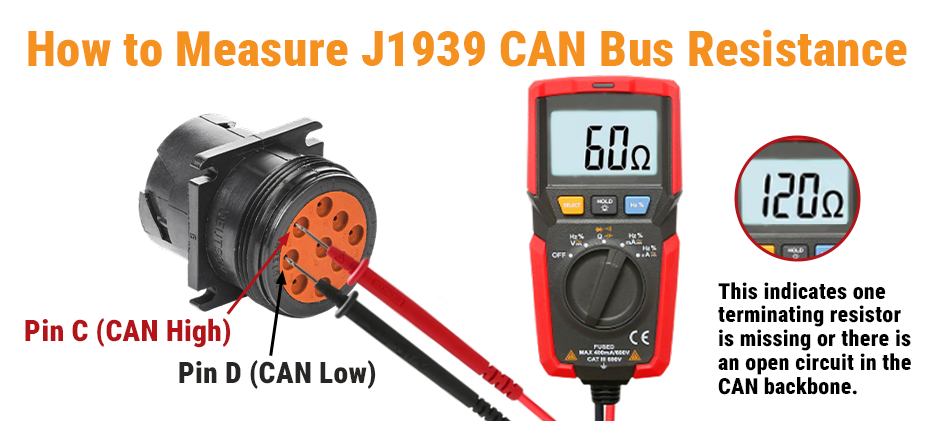
You can find the problem without changing costly parts by following this simple 4-step plan. You’ll need a digital multimeter for testing, and knowing how to test an alternator with a multimeter is a great place to start.
Step 1: Check the Battery and Power Supply
Always start by checking your power. Make sure the battery is fully charged, and the terminals are tight and clean. Start the engine and use your multimeter to confirm proper charging voltage (between 13.5 and 14.5 volts). Replace weak batteries or fix charging issues before testing anything else.
Step 2: Visually Inspect the J1939 Harness
Next, look closely at the twisted yellow and green communication wires that run through the machine. Watch for spots where wires are rubbed, pinched, or broken against metal parts. Check connectors for moisture, dirt, or corrosion, especially those near the engine or frame. Fix or replace any damaged sections you find.
Step 3: Test the Terminating Resistors
These resistors are small but essential. Turn the key off and locate the two resistors at each end of the J1939 network. Remove one and measure its resistance with a meter — it should read about 120 ohms. Then check the total resistance across the network from a diagnostic connector; it should be around 60 ohms. If it reads 120, one resistor is missing or dead. If the number is very different, there’s a wiring issue that needs to be traced.
Step 4: Isolate the Faulty Module
If all the wiring and resistors are fine, the problem is likely one bad module. Start the machine and let the code appear. Then unplug each module on the CAN network one by one. After each one, cycle the key to see if communication returns or if the warnings change. When removing one module makes the others come back to life, that is the faulty part causing the issue.
Conclusion
SPN 1231 FMI 9 always points to a network communication error rather than a broken mechanical part. If you check the power supply, wiring, and network resistors systematically, you can prevent yourself from paying expensive maintenance fees.
If a failed controller or module is the issue, it’s time for a replacement. To keep your machine’s network running smoothly, explore FridayParts for durable ECUs, controllers, and modules from now on.
